Skip to content

Autonomous AI agents that work for you 24/7

A marketer, a researcher, developer support, personal assistant, you name it. Every agent has a job, your context, and tools that reach the outside world

Being built now · Beta invites go out first · Nothing sends without your OK

Answered from one source, nothing invented

I ordered a drill two weeks ago and it stopped working. Can I return it?

Searched returns-policy.pdf

Power tools carry a 24-month warranty, so this is a warranty claim rather than a return. Reply to your order email with the order number and we'll arrange a replacement.

1 source cited · nothing invented

Built on models from

  • Anthropic
  • OpenAI

How it works

Working by Monday morning

Five minutes to set up. A step-by-step guide for each part lives in the app.

  1. 1

    Upload what you already know

    Policies, product guides, meeting notes. Your agents answer from them and name the file they used.

  2. 2

    Give it a job and a time

    Pick one of eight roles and when it works: every Monday at nine, every Friday, or the moment a customer writes.

  3. 3

    Read it over coffee

    The work is done and waiting in one inbox. Approve it, edit it, or bin it. A weekly digest sums up the rest.

The work, done

One morning's output, before you start

Real drafts from real roles — a researcher, a marketer, an assistant and a support desk, each working from your documents.

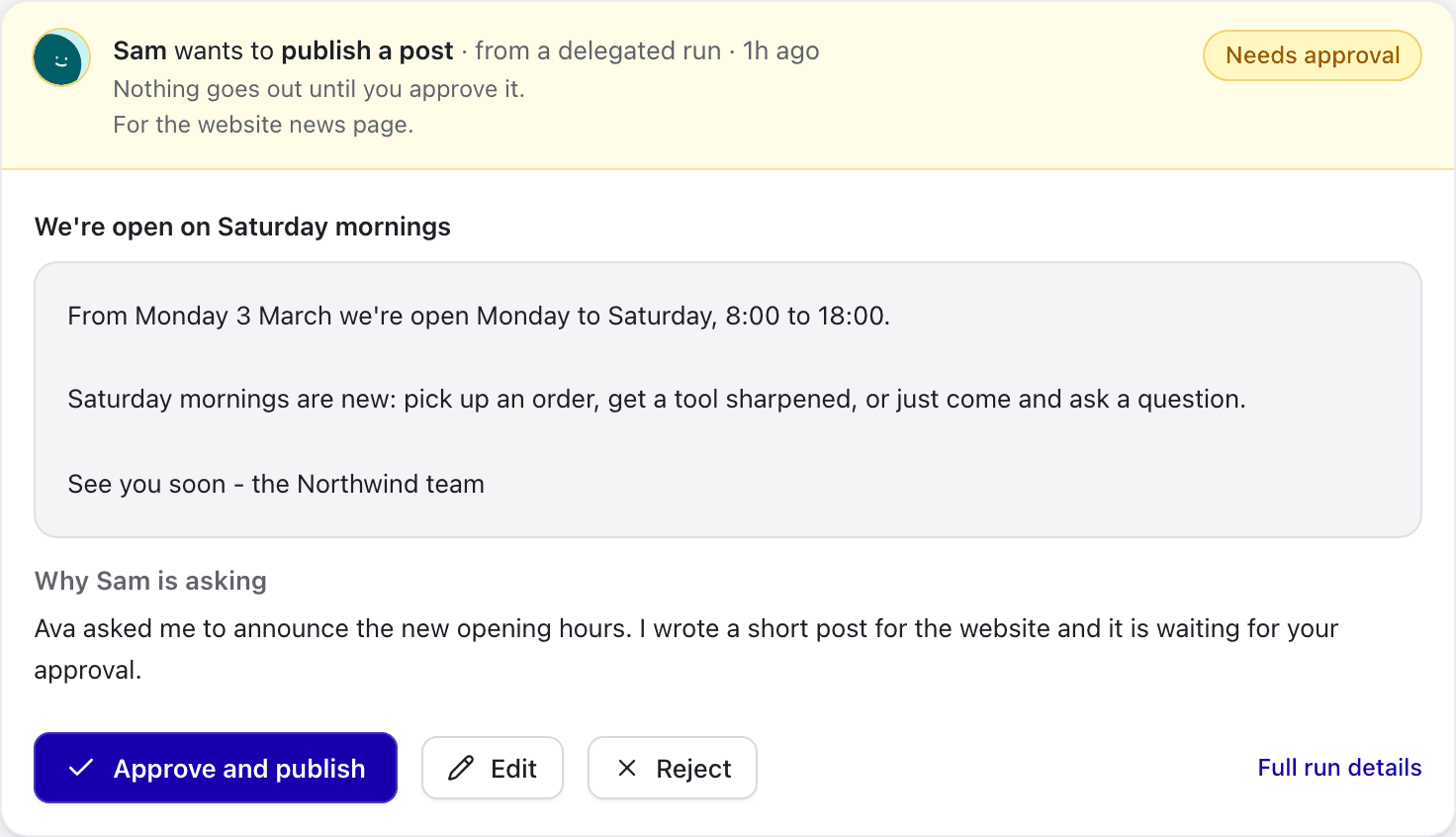
  • Approvals inbox

    Nothing goes out until you say so

    Every post, email and ticket waits here with its full text. Approve, edit or reject in one click. Every decision is logged.

    Inbox · Approvals

    Nova wants to publish a post

    Needs approval

    LinkedIn · scheduled run · Monday 09:00

    Every tool we sell now carries a lifetime warranty. Not 24 months. Lifetime. Because a drill that quits in year three was never really yours.
    Logged in the audit trail
  • Nova · Marketer

    Monday's post, written on Sunday night

    Nova reads what changed this week and drafts the post in your voice. You approve it before anyone sees it.

  • Mia · Support

    The warranty question, answered at 2am

    Mia answers from the returns policy you uploaded and names the file. When it isn't in there, she hands it to you.

  • Sol · Researcher

    What three competitors did this week

    Sol runs your standing question every Friday and writes it up with numbered sources you can open and check.

  • Ada · Dev support

    A bug report engineers can act on

    Ada answers the developer from your API docs, reproduces the error, and logs it with the steps to repeat it.

  • Kai · Assistant

    The follow-up that didn't slip

    Kai drafts the email from your meeting notes and proposes the next date. It sends when you confirm.

Trust & control

It asks before it acts

Handing work to an AI is a bigger ask than trying another app. So an agent drafts, and a person decides.

  • Nothing goes out until you approve it
    Nothing goes out until you approve itEvery email, post, calendar event and Slack message waits with its full text. Approve, edit or reject.
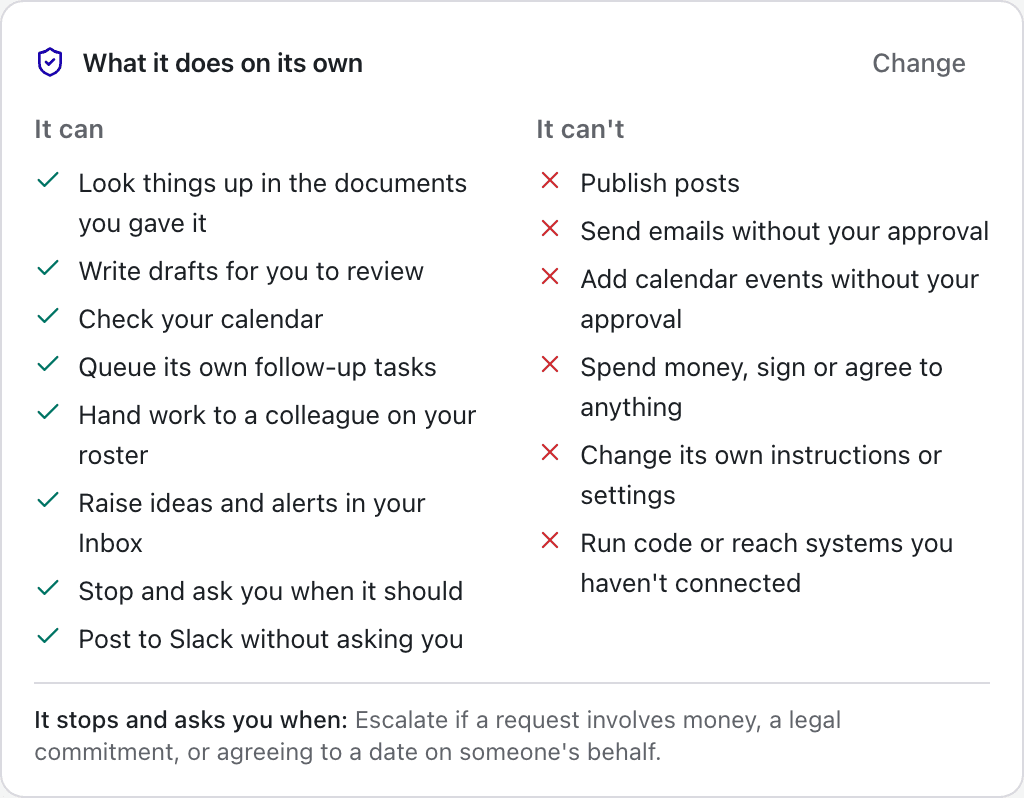
  • It can, it can't - on every agent
    It can, it can't - on every agentEach agent's page says exactly what it does on its own and what it never does without you.
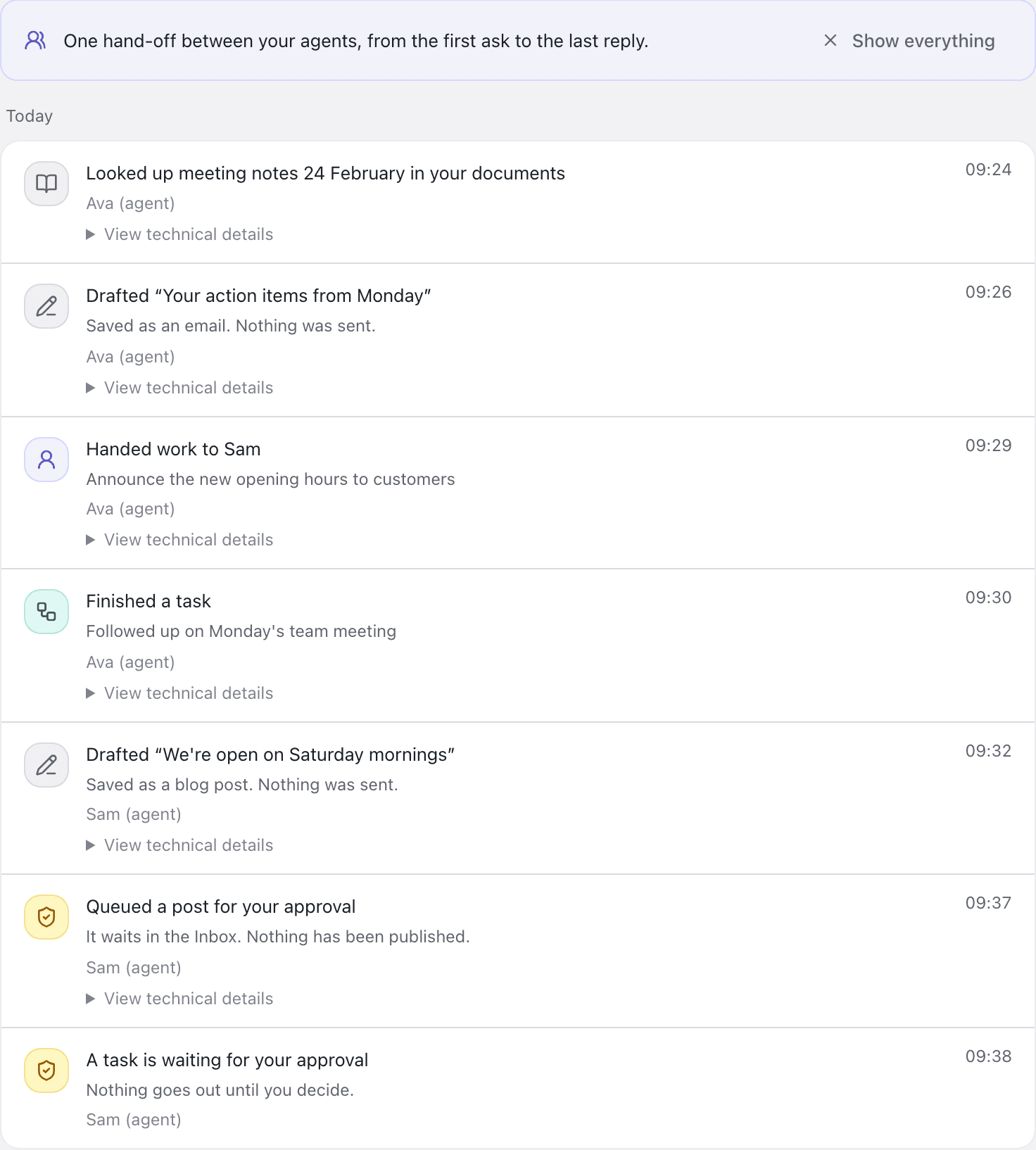
  • Hand-offs you can follow
    Hand-offs you can followWhen one agent asks another for help, the whole exchange is one thread in the Audit log.
  • Draft-only by default

    A new agent cannot publish or send anything. You allow that yourself, per agent and per tool.

  • You approve every send

    Posts and emails wait in your inbox with the full text. Approve, edit or reject — from your phone.

  • Answers name their source

    Agents answer from your documents and cited web pages. When the answer isn't there, they say so.

  • A full audit log

    Every run, draft and decision is recorded: who did what, and when.

  • Your documents are yours

    Nothing you upload is used to train an AI model. Saved credentials are encrypted.

  • It knows when to stop

    Each agent has a rule for handing off. When it applies, the agent stops and brings in a person.

The difference

Why prompt windows aren't coworkers

ChatGPT and Claude answer quick prompts. Desker gives you autonomous staff that work on your schedule, know your business, and stop for your OK.

Schedule & initiative

Generic AI (ChatGPT / Claude)

Reactive only — sits idle in a browser tab until you manually prompt it

Desker Autonomous Agents

24/7
Autonomous 24/7 — runs on schedules, events, and background triggers

Company context

Generic AI (ChatGPT / Claude)

Forgotten between sessions or re-pasted into prompt windows repeatedly

Desker Autonomous Agents

24/7
Permanent company context, structured profile, and reference documents

Taking real action

Generic AI (ChatGPT / Claude)

Outputs text in a chat bubble; cannot reach external tools or workflows

Desker Autonomous Agents

24/7
Searches the web, drafts emails, and prepares ready-to-send action items

Safety & approvals

Generic AI (ChatGPT / Claude)

No review gate — you manually copy-paste or risk unverified automations

Desker Autonomous Agents

24/7
Draft-only by default — every post and email waits for your 1-click OK

Job specialization

Generic AI (ChatGPT / Claude)

One generic chat window with no defined role, tools, or boundaries

Desker Autonomous Agents

24/7
8 tailored roles with assigned responsibilities and escalation rules

FAQ

Before you start

When can I use Desker?

We're building it now and opening a beta soon. Until then, sign-in is limited to the people testing it.

What can an agent actually do?

It answers your clients on a chat link or a widget on your site, searches the documents you upload, researches the web with citations, drafts posts and emails, logs bugs and requests, and schedules its own follow-ups. It can work on a schedule or the moment someone writes in.

Will it ever send something I haven't seen?

No. Every agent starts in draft-only mode, so posts and emails wait for your approval in the Inbox. You can loosen that per agent and per tool once one has earned it.

What happens if an agent gets it wrong?

You catch it in the inbox, because the draft is the thing you approve: reject it, or edit it and send the version you want. Every agent also has an escalation rule that stops it and brings in a person, and the audit log shows what it did and which sources it used.

Where do its answers come from?

From the documents you upload (PDF, Word, Markdown, text) and from cited web pages. When the answer is in neither, the agent says it doesn't know rather than inventing one.

Is my data secure?

Nothing you upload is used to train an AI model, and your documents are readable only inside your organisation. Integration credentials such as API keys are encrypted at rest with AES-256-GCM. It is stored with our hosting and database providers, Vercel and Neon, and deleted when you close your organisation.

Can I connect my own tools?

Today an agent can send email through your own Resend account, post notifications to Slack or any webhook, take work in through an inbound webhook, and talk to clients through a hosted link or the embed widget. Direct Gmail, LinkedIn and Slack posting are not built yet.

How long does setup take?

About five minutes: pick a role, upload a document, test it live in the playground, publish. The app has a step-by-step guide for each part, from hiring an agent to reading the audit log.

What languages does it work in?

An agent reads your documents and replies in the language you write its job in, and the models behind it handle the major languages well. The Desker interface itself is English only today.

Beta testing is coming soon

Desker is still being built. Beta testing opens soon.

No payment during the beta · Nothing sends without your OK